
Events, fairs, and conferences are the perfect stage for connecting with new customers, generating valuable contacts, and expanding a brand’s commercial network. However, it’s not enough to just attend and wait for visitors to come on their own: today, technology plays a crucial role in turning those interactions into real, measurable lead captures. Two tools that have revolutionized this process are QR codes and NFC (Near Field Communication) technology.
Both allow instant contact data collection, with no paperwork or long conversations needed. And the best part: they enable the measurement of the performance of each action. Throughout this article, we will explore innovative and effective strategies for using QR and NFC at events, optimizing every second of interaction with the visitor.
This article will guide you in the strategic use of QR and NFC to maximize lead capture at events. We will explore their benefits (speed, automation, better experience), how to implement them effectively, success stories, strategies for increasing conversion, common mistakes, and frequently asked questions. It’s your comprehensive guide to transforming interactions into business opportunities.
Using QR and NFC to Maximize Lead Capture at Events
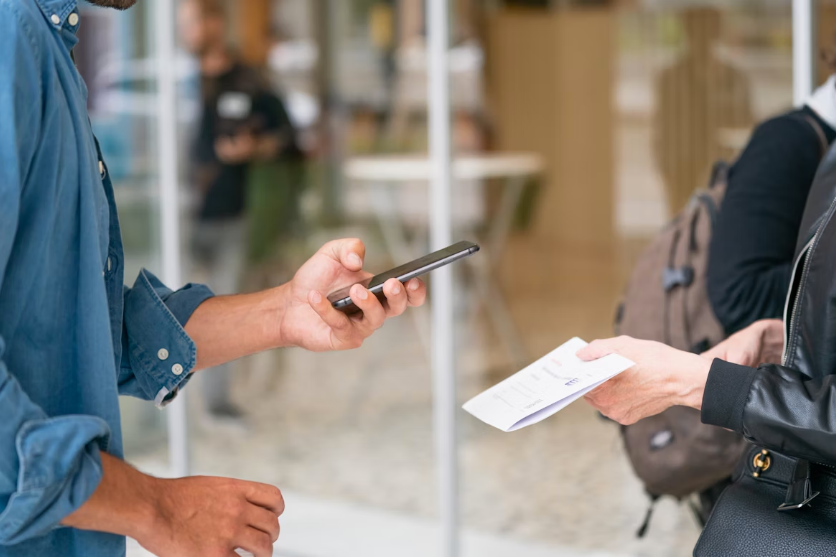
In the world of event marketing, speed and personalization are key. That’s why the use of QR and NFC has become an essential resource for sales and marketing teams looking for a more efficient, agile, and automated lead capture.
QR codes allow attendees to scan a digital card, a form, a product page, or a promotional gift from their mobile phones, making it easy to exchange contact information without physical contact. On the other hand, NFC technology (like the one we use when paying with a phone) enables content transfer simply by bringing one device close to another, without the need for scanning.
This technology is ideal for booths at trade shows, smart cards, credentials, promotional gifts, and even interactive signage. The user experience is much smoother and more modern, improving the brand’s perception and enabling much richer and more accurate data collection.
In many cases, companies that implement QR and NFC at their events report conversion rates up to 30% higher than traditional methods. This is because friction is eliminated, the process is intuitive, and there is no dependence on paper or the time of sales personnel.
Key Benefits of Using QR and NFC for Lead Capture
The use of QR and NFC technology is not just a trend. It is a strategy based on data, user experience, and operational efficiency. Here are some of the most relevant benefits:
- Speed and Convenience: Attendees don’t need to write down their email or hand over a physical card.
- Automation: Leads are automatically integrated into the company’s CRM.
- Fewer Errors: By eliminating manual data entry, human errors are reduced.
- Modern Experience: A company using QR and NFC conveys innovation and technological proximity.
- Personalization: You can redirect users to customized landing pages based on the type of event or their profile.
Marketing managers highlight that these methods also allow for better tracking of visitor behavior. For example, it’s possible to know which product was scanned the most, where in the event it was scanned, or how many times they interacted with the brand.
How to Implement QR Codes and NFC at Your Events
To effectively integrate these technologies into your event strategy, it’s essential to keep in mind several key steps:
| Stage | Recommended Action |
|---|---|
| QR/NFC Design | Create links that lead to simple forms or eye-catching digital cards. |
| CRM Integration | Use tools like HubSpot, Zoho, Mailchimp, EventsAir, or Cvent to capture data automatically. |
| Pre-Testing | Ensure that the codes and chips work properly before the event. |
| Staff Training | Teach the staff how to explain the process clearly and quickly. |
| Visitor Incentive | Offer discounts, giveaways, or exclusive content to those who scan. |
Using these technologies doesn’t mean leaving everything to the machine: it’s vital to have a trained team that knows how to guide visitors and reinforce the value of the interaction. It’s also recommended to have a stable internet connection, especially to ensure that pages or forms load without delays.
Real-Life Success Stories Using QR and NFC
Companies of all sizes, like IT Ventus, are already taking advantage of this trend. One interesting example is Salesforce, which during the Dreamforce event in San Francisco integrated NFC cards into attendees’ credentials. By bringing the card close to a smartphone, a personalized landing page with demos of their solutions, case study videos, and a meeting scheduling form automatically opened. In just two days, they captured over 3,000 qualified leads, optimizing interaction without paper and reducing wait times.
Another notable case is the natural cosmetics brand Lush, which during the VivaTech event in Paris placed QR codes on their stands and products. When scanned, visitors accessed an immersive augmented reality experience where they could see how products were made, learn about ingredients, and request samples instantly. Thanks to this action, they doubled their conversion rate compared to previous events, creating a memorable experience that reinforced their positioning as an innovative and sustainable brand.
These cases show that lead capture doesn’t depend on the size of the booth, but rather how technology and creativity are used to attract and connect with the audience.
Strategies to Increase Conversion with QR and NFC

Here are some strategies that IT Ventus uses, which can make a difference:
- Gamification: Create dynamics where attendees have to scan several QR codes to unlock prizes.
- Personalized Landing Pages: Segment your visitors by profile or interest.
- Post-Event Follow-Up: Automate a thank-you email or send exclusive content after the interaction.
- Proactive Staff: Combine digital with human interaction; encourage your team to motivate visitors to participate.
- Exclusive Content: Only accessible via QR or NFC, such as ebooks, videos, or discounts.
These strategies not only generate higher lead capture but also better-quality leads, as the visitor demonstrates active interest in interacting.
Complementary Technologies to Reinforce Lead Capture
In addition to QR and NFC, there are tools that further enhance results:
| Technology | Application |
|---|---|
| Beacons | Detect visitor proximity and send automatic notifications. |
| Augmented Reality | Allows interactive visualization of products or services. |
| Dynamic Forms | Adapt in real time to the visitor’s profile. |
| Lead Scoring | Evaluates each lead’s interest based on their behavior. |
These technologies can be integrated into a unified omnichannel strategy to make lead capture more effective, offering unique experiences that emotionally connect with the visitor.
Common Mistakes When Using QR and NFC at Events
Although these tools seem simple, improper use can ruin the experience. Here are some mistakes to avoid:
- Placing QR codes too small or in hard-to-see locations.
- Not having an internet connection at the scanning point.
- Having forms that are too long or don’t work well on mobile.
- Not offering an incentive to scan.
- Not automatically integrating the data into the CRM.
Avoiding these mistakes can make the difference between a smooth experience and a missed opportunity.
Conclusion
The evolution of event marketing is marked by technology. And in this journey, tools like QR codes and NFC technology not only facilitate contact but revolutionize how lead capture is done. Today, more than ever, capturing the audience’s attention requires immediacy, innovation, and personalization.
By adopting these tools, you not only increase your conversion chances but position your brand as modern, accessible, and user-centered. Whether you’re organizing a small booth or a large event, the possibilities offered by QR and NFC to connect with your audience and turn visits into opportunities are almost endless.
In short, if you want to transform lead capture at your events and take your strategy to the next level, don’t hesitate to get in touch with us to discover how our services can help you achieve your goals.
Frequently Asked Questions about Using QR and NFC for Lead Capture
What type of content should I offer when a QR or NFC is scanned?
It’s ideal to offer relevant, short, and visual content: a contact card, a brief form, a product demo, or an exclusive discount.
Is it necessary to have an internet connection for QR or NFC to work?
Yes, both require a connection so that the online content can load correctly. It’s recommended to have backup Wi-Fi at the event.
What platform do you recommend for generating forms integrated into the CRM?
Tools like HubSpot, Typeform, or Zoho Forms are ideal, as they allow data to be automatically integrated into the customer management system.
Can QR codes be customized with the brand logo?
Yes, there are generators like QR Code Monkey or Beaconstac that allow you to include a logo, change colors, and make them visually attractive.
Does NFC technology require an app to work?
No. On most modern phones (Android and iOS), simply bringing the device close activates the programmed action, such as opening a link.
What if a visitor doesn’t have NFC on their phone?
It’s always recommended to have QR codes as an alternative, ensuring that all attendees can interact with the content.
The manufacturing industry is undergoing one of the most important revolutions in its history. After decades of mechanical automation and digital control, artificial intelligence (AI) has burst onto the scene with the power to change how we design, produce, and manage. Far from being a passing trend, AI in manufacturing represents a deep, structural, and lasting shift in how modern factories operate.
Rather than simply automating repetitive tasks, AI enables machines to think, learn, and act autonomously based on the data they receive. This means a production line no longer just follows commands—it can now predict failures, adapt to new conditions, improve final product quality, and even suggest continuous improvements.
AI in Manufacturing: What Does This Change Mean?

Talking about AI in manufacturing is not just talking about robots or advanced algorithms. It’s about a new way of operating that combines data, machine learning, and advanced automation to make decisions faster and more accurately than ever before.
Instead of reacting to problems once they occur, smart factories act before issues arise. How do they do it? Through systems that collect real-time data, process it with trained AI models, and trigger automatic responses. For example, if a machine is vibrating more than usual, the system can predict a failure and schedule maintenance—no human intervention needed.
But that’s just the beginning. In this new era, AI also helps with product design, production planning, supply chain management, and quality control. Its impact is broad and deep, affecting everything from business strategy to daily operations.
Moreover, this transformation is inclusive. It’s no longer reserved only for giants like Tesla or Siemens. Thanks to cloud-based solutions and accessible platforms like Microsoft Azure, even small and medium-sized companies can integrate AI into their processes without making massive upfront investments.
Main Applications of AI in Manufacturing
AI in manufacturing translates into many practical applications that improve efficiency and quality in industrial work. Here are the most relevant:
Predictive Maintenance
One of the most widespread uses of AI. It helps anticipate when equipment will fail, based on historical patterns and real-time data. This prevents unexpected downtimes, reduces repair costs, and extends asset life.
Automated Quality Control
Thanks to machine vision and machine learning systems, AI can detect tiny defects in parts or products that would be invisible to the human eye. This improves final quality and reduces waste.
Process Optimization
AI algorithms analyze workflow, identify bottlenecks, and propose automatic adjustments to optimize production. All of this can happen in seconds, without human intervention.
Smart Supply Chain Management
AI can forecast product demand, optimize inventory levels, and improve logistics. This allows for more agile production and better adaptation to market changes.
Collaborative Robots (Cobots)
AI-powered robotics has evolved toward machines that learn from workers and collaborate with them. They’re safer, more flexible, and more efficient.
Digital Twins
Creating a virtual replica of a machine or system allows you to test configurations, simulate scenarios, and predict outcomes—without interrupting actual production.
Benefits of AI in Modern Manufacturing
The benefits of applying AI to manufacturing show up quickly. Below are some of the clearest advantages:
| Benefit | Description |
|---|---|
| Increased productivity | Tasks are completed faster, with fewer errors and greater continuity. |
| Cost reduction | Prevents unexpected downtimes, material waste, and overproduction. |
| Improved product quality | Error and defect detection becomes more precise and consistent. |
| Data-driven decision-making | AI turns raw data into valuable insights for smarter decisions. |
| Operational flexibility | Allows real-time process adjustments based on demand or external conditions. |
| More sustainable production | Optimizes resource use, reduces energy consumption, and minimizes environmental impact. |
Challenges and Ethical Considerations When Implementing AI

Adopting AI in industry also brings new challenges—some technological, others cultural, and many ethical. Here are the most significant:
- Cultural Change and Resistance: not all employees are ready to trust decisions made by machines. Resistance to change is common, especially among those who fear job replacement.
- Reskilling Human Talen: AI doesn’t eliminate jobs; it transforms them. Companies must invest in continuous learning and professional retraining so employees can adapt to new roles.
- Data Privacy and Security: with the integration of sensors and connected systems, millions of data points are generated that must be protected. Industrial cybersecurity becomes essential.
- Responsibility in Decision-Making: when an AI makes a decision affecting production or the customer, who is accountable? These dilemmas require clear ethical and legal frameworks.
- Algorithmic Transparency: it’s crucial for companies to understand how AI models work, what data they use, and how they make decisions.
Real Success Stories in Industry
- Bosch: this German multinational has implemented AI in its assembly plants to detect minimal deviations in quality. As a result, they’ve reduced defective products by 35%.
- Nestlé: in its packaging plants, the Swiss company uses AI-powered vision systems to ensure every package meets quality standards. The result: significant efficiency improvements.
- Renault: the French automotive group uses digital twins and AI algorithms to simulate engine behavior before manufacturing, thus reducing development time and production errors.
Conclusion
AI in manufacturing is not a distant promise—it’s a present-day reality. Smart factories are already transforming their processes, making real-time decisions, learning from data, and maximizing performance. This revolution impacts not only production but also product quality, sustainability, and global competitiveness.
Moving from predictive production to total optimization is possible today thanks to accessible technologies, accumulated knowledge, and proven experiences. To achieve this, it’s essential to adopt an open mindset, invest in training, and understand that artificial intelligence doesn’t replace people—it empowers them.
Frequently Asked Questions About AI in Manufacturing
Which industries benefit most from AI in manufacturing?
All industries can benefit, but automotive, electronics, pharmaceutical, food, and metal industries are leading adopters.
How do you start implementing AI in a factory?
It’s best to start with a pilot project, such as predictive maintenance, and then scale up to other areas.
How long does it take to see return on investment?
It depends on the project, but many companies see positive results in less than a year.
Do companies need in-house AI experts?
Not always. Businesses can work with tech partners or purchase turnkey solutions while training internal teams.
Can AI systems integrate with older machinery?
Yes, using additional sensors and platforms to collect environmental data, AI can be applied even to legacy equipment.
What advantages does AI offer over traditional automation?
AI doesn’t just execute tasks—it learns, improves, and adapts, making it a much more powerful tool.
In event planning, every second counts. The way we manage attendee access can significantly influence the perception of the event, its security, and operational efficiency. That’s why digitizing events access control has become an essential element for delivering a modern, seamless, and memorable experience.
From planning to post-event analysis, technology allows us to control who enters, when they do, and which areas they access. All in real time, with no paperwork and enhanced security. In this article, we share our experience managing events using proven technological solutions and explain how to implement them successfully.
Steps to Digitize Events Access Control
Digitizing access is much more than scanning a QR code. It means integrating a smart system that centralizes information, automates processes, and improves the experience for both attendees and organizers.
The first step is defining the type of credential: physical badges with a chip or QR code, NFC wristbands, or simply the attendee’s mobile phone. In our experience, personalized QR codes embedded in an event app offer a versatile solution: they allow access validation, unlock content, and register attendance at specific sessions. These can be combined with self check-in kiosks or support staff equipped with tablets to cover various access points.
Another key step is syncing these access points with the event’s database. For instance, by integrating scanners with the accreditation app, we can monitor in real time how many people are inside, which sessions are active, or which users have VIP access. This visibility allows us to respond quickly to any incident and anticipate logistical needs.
Benefits of Digital Events Access Control

Greater Security from the First Scan
Digitizing access greatly reduces the risk of duplicate entries, forged credentials, or human errors. Each QR code is unique and linked to a record with clear access rules. Additionally, we work with profile-based control systems, ensuring that each attendee only accesses the areas assigned to them.
Faster Entry, Shorter Lines
Waiting times at the entrance are one of the most impactful factors on attendee satisfaction. We’ve seen how self check-in technology and mobile scanning can reduce entry times by up to 70%. This frees up staff and enables a more organized, stress-free entrance.
Real-Time Capacity Monitoring
One of the major benefits is the ability to visualize the number of people in each area—crucial for safety, space management, and compliance. This data also helps identify behavior patterns, such as peak times or the most crowded zones.
Improved Attendee Experience
It’s not just about fast entry, but also about a more connected experience. Using an app with integrated access features, users can check their schedule, receive notifications, or find their room on an interactive venue map.
Operational Savings and Scalability
Automating access control reduces the number of staff needed for managing entries and minimizes manual errors. These solutions are scalable, performing equally well at events with 100 or 10,000 people.
Technologies That Power Digital Access Control
| Technology | Key Features | Ideal Use Case |
|---|---|---|
| QR Codes | Customizable, scannable from paper or mobile | All event types |
| NFC Wristbands | Contactless, durable, reusable | Outdoor events, festivals |
| Mobile Apps | Integrated access, agenda, networking, notifications | Conferences, trade shows, launches |
| Self Check-in Kiosks | Unattended registration, on-the-spot badge printing | High-volume access points |
| Facial or Biometric ID | Advanced, secure validation | VIP, corporate, or tech-heavy events |
In our projects, we often combine several of these technologies depending on the event profile. For example, at trade fairs, exhibitors use the app to scan badges and capture leads, while general attendees enter using personalized QR codes or NFC wristbands.
How to Successfully Implement a Digital Access Control System

1. Define the required access types.
Do all attendees have the same access level? Are there restricted zones? This will help segment access from the start.
2. Choose the right tools.
Depending on the event type, we recommend either robust or lightweight solutions. For high-volume events, kiosks and on-site printing are essential. For smaller gatherings, mobile scanning may be enough.
3. Prepare the system in advance.
Technical testing, simulations, and database checks are vital to ensure a smooth operation on event day. Make sure scanners work offline in case of network issues.
4. Train staff and support teams.
Even though many features are automated, trained human staff remain essential for troubleshooting, handling exceptions, or guiding users.
5. Analyze post-event data.
After the event, the collected data provides valuable insights into attendee behavior—such as which areas were visited most, how long they stayed, and which sessions had the highest turnout.
An All-in-One Solution: The IT Ventus App That Centralizes the Event Experience
At IT Ventus, we’ve developed an all-in-one platform that brings together, in a single app, all the essential functionalities for organizers, attendees, and exhibitors. This centralized solution goes far beyond ticket scanning: it connects access control with registration, scheduling, networking, lead capture, and real-time analytics.
Our events app allows you to manage everything from badge design to capacity control, including interactive venue maps, segmented communication, live polling, and gamified networking. Each user enjoys a personalized experience: attendees can build their own agendas, receive relevant notifications, and check into specific sessions by scanning directly from their mobile phones. At the same time, organizers gain access to key data about attendee behavior and the performance of each space or session.
For events with exhibitors, the app includes a dedicated portal for lead scanning, profile management, and direct communication with the organizer. Everything is connected, everything is automated. Best of all, each feature adapts to the user profile and event type—no need for multiple tools or complex external integrations.
Common Mistakes to Avoid
- Relying solely on internet connection: always configure systems that also work offline.
- Failing to anticipate issues: have backup protocols for lost badges, reprints, or manual validation.
- Underestimating access volume: managing 200 people isn’t the same as 3,000 in 20 minutes.
- Not integrating access with other event tools: disconnected apps and systems lead to inefficiencies and missed opportunities.
Conclusion
Digitizing events access control has gone from being an innovative option to an operational necessity. It enables faster, safer, and more personalized experiences while providing valuable data to improve future editions.
Working with flexible, scalable technology adapted to each event type has allowed us to turn manual processes into dynamic and precise ones. From the first access scan to attendance reports, every contact point adds value to the overall experience.
If you’re looking to professionalize your event and deliver a high-level experience, digital access control is the perfect starting point. And if you integrate it with your event app, registration system, and engagement strategy, the impact multiplies.
Interested in discovering how to optimize your events with integrated tech solutions? Don’t hesitate to contact us.
Frequently Asked Questions About Events Access Control
Do all attendees need to use an app?f
No. Access can be offered via printed QR codes, mobile tickets, or physical badges—depending on the audience profile.
What if someone loses their accreditation?
We have systems in place to instantly reprint badges or resend digital QR codes.
How is zone-based access managed?
We assign rules based on user profiles. This ensures each type of attendee only accesses authorized areas.
What happens if there’s no internet at the venue?
Our scanners and apps work in offline mode and sync data once the connection is restored.
Can sponsors be included on badges or access points?
Yes. Sponsor logos can appear on badges, kiosks, or interactive screens—even in the automated event summaries.
What are the benefits of integrating access with other event tools?
Unified management allows for a deeper understanding of the audience, personalized experiences, and smoother overall event flow.
In a world where information flows at lightning speed, having tools that help us synthesise and organise event data is essential. AI for event summarisation has become an invaluable ally for professionals, organisers, and enthusiasts alike who want to retain the most important insights from each gathering. In this article, we take a closer look at how this technology works, its benefits, and how to choose the right solution for your needs.
The Best AI for Summarising Events
Event summary AIs are platforms based on artificial intelligence designed to process text, audio, and video identifying key ideas and generating condensed versions without losing essential context. These tools use advanced language models, neural networks, and deep learning techniques to “read” or “listen” to your event and deliver a clear summary in seconds.
Using summarisation AI means you can focus more on engaging with attendees instead of manually taking notes. Tools like Otter.ai or Sonix, for example, detect topic changes and highlight key phrases, keeping the output focused and coherent. Instead of reviewing hours of footage, you’ll have a concise document highlighting each major point, often with timestamps for easy reference.
How Event Summary AI Works
Summary AI tools typically follow three main stages:
- Data Capture: The platform ingests content in text or audio format (talks, presentations, panel discussions).
- Semantic Processing: Using Natural Language Processing (NLP) models, the AI analyses the content, identifying entities (people, places, concepts) and detecting the logical structure of the discourse.
- Summary Generation: With abstraction and extraction techniques, the AI selects the most representative phrases and builds a compact text that preserves coherence and the overall narrative of the event.
This process happens in milliseconds or just a few minutes, depending on the length of the original material.
Benefits of Using AI to Summarise Your Events
Using AI for event summarisation offers multiple advantages:
- Time-saving: Turn hours of content into minutes of reading.
- Accuracy and consistency: Delivers a uniform quality across all summaries, without fatigue.
- Improved accessibility: Makes key content accessible for those who couldn’t attend or are short on time.
- Boosted productivity: Allows organisers to focus on improving the event experience instead of manual transcription.
- Flexible integrations: Many AI tools integrate with video conferencing platforms (Zoom, Teams), file managers (Google Drive, Dropbox), and project management tools.
Key Features of the Best Event Summary AI
In recent years, several AI solutions have emerged promising to turn hours of content into concise summaries. But which one truly stands out? Here are the essential features to look for:
- Linguistic accuracy: Ability to understand nuance and jargon.
- Fast processing: Near real-time summaries.
- Multi-platform integration: Support for Zoom, Teams, Google Meet, and more.
- Customisable formats: Bullet lists, narrative paragraphs, or tables.

The best AIs for summarizing your events
Top AI Tools for Event Summaries
1. IT Ventus AI Insight
IT Ventus offers a comprehensive artificial intelligence solution designed to transform how events are experienced, communicated, and analysed. Its AI system generates real-time and end-of-day summaries, capturing key moments from talks and sessions, and delivering ready-to-share insights across any device.
Key features:
- Minute-by-minute automatic summaries during sessions, viewable on venue screens or attendee mobile devices.
- Custom daily summaries highlighting key takeaways and practical learnings.
- Visual reports with word clouds, highlighted themes, and topic analysis.
- Live dynamic pages with engagement metrics and an AI bot for interactive queries.
- Integration with other IT Ventus platform features: registration, networking, lead capture, gamification, and analytics.
Typical use case:
During an international congress, IT Ventus AI analyses all sessions in real time and generates a visual summary for each one. At the end of the day, attendees automatically receive a PDF report highlighting the most important moments, including graphics, insights, and trending topics.
This content is used by marketing teams to extend event impact on social media, by speakers to amplify their message, and by organisers to get detailed analytics on session engagement. Sponsors can also be featured in these reports for added post-event monetisation.
2. Otter.ai
Otter.ai is one of the most popular tools for transcribing and summarising meetings, conferences, and interviews in real time. It uses advanced machine learning models to distinguish between speakers and generate highly accurate transcripts.
Key features:
- Live, collaborative transcription.
- Automatic speaker identification.
- Auto-generated highlight summaries.
- Integration with Zoom, Microsoft Teams, and Google Meet.
Typical use case:
During a board meeting, Otter.ai allows all attendees to view the live transcript and highlight key passages. At the end, it generates a “Highlights” summary to easily share the most important points with absentees.
3. Sonix
Sonix specialises in automated transcription and translation of audio and video. Beyond its powerful transcription engine, Sonix offers editing tools and keyword-based summaries.
Key features:
- Transcription in over 40 languages.
- Configurable automatic summaries by length.
- Online editor for refining transcripts.
- Export options in SRT, VTT, Word, and PDF formats.
Typical use case:
For an international webinar, Sonix simultaneously translates and transcribes into several languages, then produces a summary of each section for distribution across global teams.
4. Descript
Descript combines transcription with AI-powered audio and video editing tools. By editing the transcript, users also modify the underlying media. It also features a “Summary” function that extracts key points from any recording.
Key features:
- “Overdub” editing: AI-generated audio corrections.
- Automatic filler word and silence removal.
- Script-style or bullet point summaries.
- Integration with podcasting and video production tools.
Typical use case:
A marketing team records an internal podcast using Descript. While editing the transcript to trim pauses and “umms”, Descript instantly generates a summary with the main ideas to publish on the company blog.
5. AudioDigest AI
AudioDigest AI is geared towards healthcare professionals and medical researchers. It turns recordings of seminars, conference talks, and masterclasses into structured summaries with references.
Key features:
- Medical terminology recognition: Automatically generates glossaries.
- Auto-citation: References in APA or Vancouver formats.
- Export to HTML and LaTeX: Ideal for academic reports and articles.
Typical use case:
At a cardiology symposium, AudioDigest AI converts a two-hour session into a 3-page report with full citations, saving researchers days of work.

Conclusion: Innovate with AI in Your Events
Using AI to summarise your events not only saves time it also improves the quality of both internal and external communication. Whether you’re organising conferences, workshops, or team meetings, these five tools offer tailored solutions for different contexts.
After comparing the options, we recommend trying IT Ventus’ AI solution for a comprehensive analysis of everything happening at your events.
At IT Ventus, we combine our expertise in software development and event technology to empower organisations.
Don’t wait to optimise your productivity and take your events to the next level get in touch with us!
Frequently Asked Questions (FAQs) – The Best AI for Event Summarisation
What kind of content does IT Ventus’ AI summarise?
IT Ventus AI delivers real-time summaries of talks, panels, and debates, along with daily and final reports. These include key points, practical insights, visual elements (e.g., word clouds and featured themes), and can be adapted to different formats and audiences.
Can Sonix automatically translate summaries into other languages?
Yes. Sonix supports over 40 languages and lets you convert the original transcript into one or more target languages. After the initial transcription, just select the “Translation” option and choose the desired language—the summary and key notes will adapt to the translated text.
What report formats are available with IT Ventus AI?
Reports can be delivered in digital formats (PDF, 16:9 presentations, or custom sizes). They are optimised for social media sharing and post-event content distribution.
How does Sembly analyse participation and speaker tone during a meeting?
Sembly measures participation by tracking the length and frequency of each participant’s speaking turns. To analyse tone, it uses natural language processing and voice prosody analysis to detect basic emotions (joy, tension, neutrality) and highlights moments where tone shifts significantly.
In today’s professional world, building strong networks is essential to achieving success. But how can you truly make the most of these encounters? Networking events provide a great opportunity to establish relationships that could shape your future.
From small conferences to large business trade shows, networking is the key factor for advancing in any professional field. In this article, we’ll explore the importance of networking at events, how to optimise your participation through technology, and some practical tips to help you stand out at every gathering.
Networking Events: Why Are They Essential?
Networking events are much more than just professional meetups. These spaces have become a vital tool for forging business relationships, uncovering new career opportunities, and exchanging valuable experiences with peers from your industry. But what makes them truly indispensable?
First of all, these events offer the perfect setting to break through digital barriers, enabling face-to-face interactions that significantly enrich the quality of connections. Direct communication not only allows for a smooth exchange of ideas, but also provides the chance to read non-verbal cues—essential for building trust quickly.
What’s more, attending networking events regularly increases your professional visibility. By staying active at these gatherings, people will start to recognise you as someone engaged and passionate about your field. This positive reputation can open doors to unique opportunities that you might not find elsewhere.
It’s important to remember that networking success isn’t measured by the number of contacts you collect, but by the quality and depth of the relationships you build. Good networking can turn casual encounters into long-term strategic connections that support you over time.
Finally, actively participating in networking events greatly improves your social and communication skills. Practicing how to introduce yourself clearly, listening actively, and asking insightful questions are key abilities that develop naturally in these events.

How to Optimise Your Experience at Networking Events
Maximising your impact at networking events doesn’t happen by chance. It’s a combination of preparation, mindset, and strategy. Here are some practical tips that will greatly boost your success:
Do your research before the event
Knowing in advance who will be attending lets you prepare more relevant conversations. Look up speakers, participating companies, and clearly define your goals for the event.
Perfect your personal pitch
The famous “elevator pitch” is essential at networking events. Be ready to explain who you are, what you do, and why someone should talk to you—all in under a minute. Practice ahead of time so you feel confident during the event.
Listen more, talk less
Although it may sound counterintuitive, active listening is a powerful networking tool. People remember those who show genuine interest. Ask open-ended questions that encourage others to share their stories and perspectives.
Set clear goals
Know what you’re looking for: clients, suppliers, strategic partners, or professional inspiration. Keeping your objective in mind will help you focus your efforts on the right people.
Use technology to your advantage
Leverage tech tools to build and strengthen relationships with new clients and partners. Below, we showcase one of the best examples of event-tech integration on the market today.
The Event App by IT Ventus
In an increasingly digital world, technology plays a key role in boosting the impact of networking events. A prime example is the Event App developed by IT Ventus—a solution designed specifically to enhance the experience of both attendees and organisers.
The app lets you browse the programme and sessions, but it’s far more than a digital guide. Its true value lies in how it enables real connections between participants, thanks to features like:
- Direct messaging between attendees, perfect for breaking the ice and starting conversations.
- An integrated agenda to schedule one-on-one meetings, making it easy to plan strategic encounters in advance.
- Meeting requests between exhibitors and visitors, encouraging business opportunities right from the start.
- Gamification elements to drive active user participation.
- Interactive tools for sessions, including live polls, audience voting, and Q&A features.
These functionalities completely transform the way people interact at events, creating a more dynamic, organised, and engaging experience. For organisers, the app also serves as a strategic tool to facilitate networking, gather valuable data, and increase overall satisfaction.
Unexpected Benefits of Attending Networking Events
Often, the advantages of networking events go beyond the obvious. These gatherings can offer unexpected benefits that may significantly impact your professional and personal life.
Some of these hidden perks include:
- Professional inspiration: Hearing success stories from influential people can motivate you to take bolder steps in your career.
- Creative solutions: Informal conversations often spark innovative ideas that wouldn’t surface in more formal settings.
- Increased self-confidence: Every successful interaction boosts your self-esteem and communication skills.
Conclusion: Your Future Begins at Networking Events
Making the most of networking events can be the difference between an average career and a truly successful one. Building meaningful and strategic relationships is key to achieving sustainable and dynamic professional growth.
Remember, networking isn’t just about meeting people—it’s about creating authentic relationships that lead to mutual success. Attending regularly and applying the tips shared here will put you in a prime position to shine professionally.
Don’t wait! Choose your next event and start expanding your professional network today. Contact IT Ventus to integrate our AI-powered solution into your next event.

Frequently Asked Questions (FAQs) About Networking Events
What exactly is networking?
Networking is the act of building professional relationships through interaction and the exchange of information, support, and advice in both social and business contexts.
How much time should I spend networking at an event?
Ideally, 60–70% of your time should be dedicated to active networking, while still leaving space to attend sessions and workshops.
How can I overcome shyness at networking events?
Prepare in advance, practice a short personal pitch, and start conversations with open questions to ease your initial anxiety.
What mistakes should I avoid at networking events?
Avoid being too pushy, talking only about yourself, or appearing only interested in what you can gain. Effective networking is about balance, empathy, and authenticity.
What should I do after a networking event?
Send personalised follow-up messages thanking people for the conversation and suggesting future collaborations or informal meetings.
How can I choose the best networking events?
Look for events directly related to your industry, and check past reviews to ensure the quality and profile of attendees will be worth your time.